Lume has a standard for MIDI files to ensure some cross compatibility between different layouts, known as the Lume MIDI Standard. It is used specifically by complex layouts (multi-channel MIDI files). Simple layouts ignore MIDI channels and will accept all notes.
Custom layouts/graphics are not required to follow the Lume MIDI Standard.
Note Value
This section refers to a planned feature. This has not been implemented.
Lume accepts note values in the range of [12, 119] (C0 to B8, inclusive), giving a range of 9 octaves.
The note values within [0, 11] (C-1 to B-1, inclusive) and [120, 127] (C9 to G9, inclusive) are reserved for graphics to use as control values. They should not be used for normal rendering.
Channels
Lume assigns each channel an instrument type that it looks out for. The list
The current Lume standard for MIDI channels is as follows:
| Channel | Type |
|---|---|
| 01 | Piano/Keyboard |
| 02 | Lead 1 (Primary) |
| 03 | Lead 2 (Secondary) |
| 04 | [unused] |
| 05 | [unused] |
| 06 | [unused] |
| 07 | [unused] |
| 08 | [unused] |
| 09 | [unused] |
| 10 | Drums |
| 11 | Pitched Percussion |
| 12 | [unused] |
| 13 | [unused] |
| 14 | Bass |
| 15 | [unused] |
| 16 | [unused] |
The subsections go into more detail on the expectation of each channel.
Channel 1 (Piano/Keyboard)
Channel 1 is a general-purpose channel for any pitched instrument, capable of being used by monophonic and polyphonic parts. However, because it is intended to be versatile (handle a lot of notes at once), it's recommended to use this channel for chords mainly, such as piano and string parts.
Channel 10
This section refers to a planned feature. This has not been implemented.
To help Lume have some compatibility with files that comply with general MIDI, channel 10 is designated as the drums channel.
However,
Lume's channel 10 configuration is based off of General MIDI's system, which specifically locks channel 10 to percussive sounds, with a percussive map that denotes the sound that each MIDI key represents.
Lume uses a smaller map, only including 16 notes rather than full 47. This is because Lume's visualizers are often abstract than not, and do not require a sound to be mapped to a specific key.
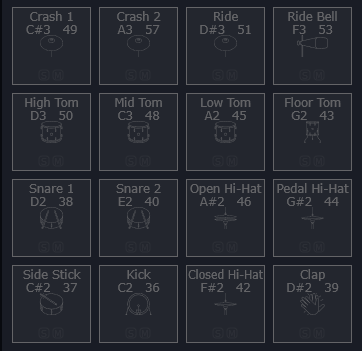
The full list of Lume's percussion map is listed below (sorted from top-left to bottom-right):
| Name | MIDI | Note |
|---|---|---|
| Crash 1 | 49 | C#3 |
| Crash 2 | 57 | A3 |
| Ride | 51 | D#3 |
| Ride Bell | 53 | F3 |
| High Tom | 50 | D3 |
| Mid Tom | 48 | C3 |
| Low Tom | 45 | A2 |
| Floor Tom | 43 | G2 |
| Snare 1 | 38 | D2 |
| Snare 2 | 40 | E2 |
| Open Hi-Hat | 46 | A#2 |
| Pedal Hi-Hat | 44 | G#2 |
| Side Stick | 37 | C#2 |
| Kick | 36 | C2 |
| Closed Hi-Hat | 42 | F#2 |
| Clap | 39 | D#2 |
The selection of notes is derived from the plugin Micro Drum Sampler (MDS), a built-in plugin from the DAW Waveform:
Note Precedence
Because different drum visualizers will support different amounts of notes, a note hierarchy exists to determine what notes take priority for rendering. This allows for full-size drum parts that use all 16 notes to be rendered with visualizers in a way that ensures that the most important notes are still shown.
For example, the Kick (36, C2) will always be included in a drum visualizer, as it has the highest predence out of all the notes.
The list of Lume's percussive map (sorted by highest to lowest precedence) is listed as such:
| Name | MIDI | Note |
|---|---|---|
| Kick | 36 | C2 |
| Snare 2 | 40 | E2 |
| Closed Hi-Hat | 42 | F#2 |
| Open Hi-Hat | 46 | A#2 |
| Pedal Hi-Hat | 44 | G#2 |
| Clap | 39 | D#2 |
| Side Stick | 37 | C#2 |
| Snare 1 | 38 | D2 |
| High Tom | 50 | D3 |
| Low Tom | 45 | A2 |
| Crash 1 | 49 | C#3 |
| Ride | 51 | D#3 |
| Crash 2 | 57 | A3 |
| Mid Tom | 48 | C3 |
| Floor Tom | 43 | G2 |
| Ride Bell | 53 | F3 |
Snare 2 having precedence over Snare 1 is intentional.
A layout's documentation will include the amount of notes they support for drum parts.
Grid Layout
Visualizers that use a grid of buttons must have a button layout based off of MDS, specifically the first page.
This rule is excempt for grids of buttons represented pitched sounds, or grids larger than 4 by 4.
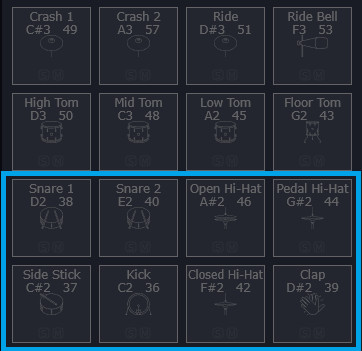
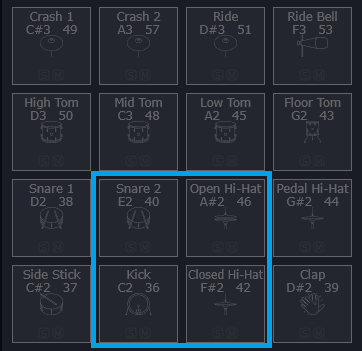
Grids smaller than 4 by 4 must adhere to a specific subsection of the grid, based off of the "importance" of the notes in the grid. A list of the officially-supported subsections are noted below:
Full Size Drum Grid (4 by 4)
2 by 4
2 by 2
Non-Grid Layouts
Non-grid drum visualizers do not need to base their drum positionings based off of the grid layouts (because they cannot), and simply need to adhere to the note precedence.
Velocity
Velocity is not processed by Lume.